Tools Menu
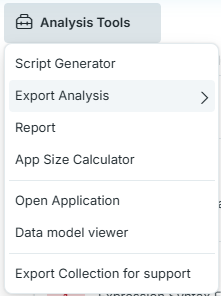
When viewing an Analysis, use the Analysis Tools menu to access the following features:
Script Generator -- Create script statements that implement QSDA recommendations. Paste the generated statements into your Qlik Load Script. The available generators are:
- AutoNumber Keys: Create AutoNumber statements for eligible key fields.
- Drop Fields: Generate a Drop Fields statement for unused fields.
- Drop Tables: Generate a Drop Tables statement for unused tables.
- Load Statement: As an alternative to dropping unused fields, generate a LOAD statement with unused fields commented out.
Export Analysis -- Download the analysis as CSV (ZIP), Excel, or SQLite, or create an analysis app with Export to Qlik. See Export Analysis for destinations, permissions, row limits, and schema compatibility. CSV downloads include a generated sample load script and schema manifest for the selected export schema.
Report -- Generate a static HTML analysis report.
App Size Calculator -- A planning tool that lets you calculate the size of your app with different data volumes.
Open Application -- Open the application in the Qlik Sense Hub.
Data model viewer -- Open the data model viewer for this application in the Qlik Sense Hub.
Open Application and Data model viewer are disabled for offline analyses and imported collections.
Export Collection for support -- Export and download the collection to share with support.