System Requirements
Disk Space
- 1500 MB for installation files
- 500 MB for configuration, logs and QSDA repository
Memory
Available to QSDA Pro, in addition to the OS and other software on the server
- Minimum: 1 GB
- Recommended: 4 GB or more for large apps or many concurrent analyses
Total for a dedicated server, including the Windows OS
- Minimum: 8 GB
- Recommended: 12 GB or more for large apps or many concurrent analyses
If installing on a server shared with other software, such as a Qlik node, plan for this much in addition to that software’s requirements.
CPU
Most of the heavy lifting work, such as calculation timing, is done on the Qlik Servers. Even so, QSDA Pro can benefit from multiple processors during collection and analysis. This is especially true when there are concurrent QSDA Pro users.
- Minimum: two cores
- Recommended: four or more cores for optimal performance.
It is acceptable to install QSDA Pro on a Qlik server. We do not recommend installing on a production node.
Supported OS
QSDA is distributed for 64-bit Windows (x64) with its .NET 10 runtime included. A separate .NET installation or an Internet connection to download the runtime is not required.
Use an OS edition and build supported by .NET 10:
- Windows 11 on a supported servicing release.
- Windows 10 only where its edition/build remains supported, such as the supported LTSC editions; "1607 or later" alone is not a support guarantee.
- Windows Server 2016 or later while that release remains supported by .NET 10 and Windows servicing.
Check Microsoft's .NET 10 supported OS matrix for edition and lifecycle qualifications. Contact Motio Support to confirm a specific deployment; runtime support alone does not establish that a QSDA deployment has been tested.
Supported Browsers
- Chrome
- Microsoft Edge
- Firefox
- Safari
Network
QSDA Pro uses websockets to communicate between browser and QSDA Web server. If hosting QSDA behind a load balancer or reverse proxy, ensure your network is configured to support websockets.
Screen Resolution
The minimum supported screen resolution is 1374 x 768. For the best experience, use a larger screen size.
Supported Qlik Versions
QSDA Pro supports the same Qlik Server versions that Qlik supports, generally two years from release date. QSDA Pro generally works with older Qlik versions as well. Contact Motio Support if you have questions about compatibility with a specific Qlik version.
Browser Settings
- For all browsers, allow popups so that QSDA and Qlik login functions work correctly.
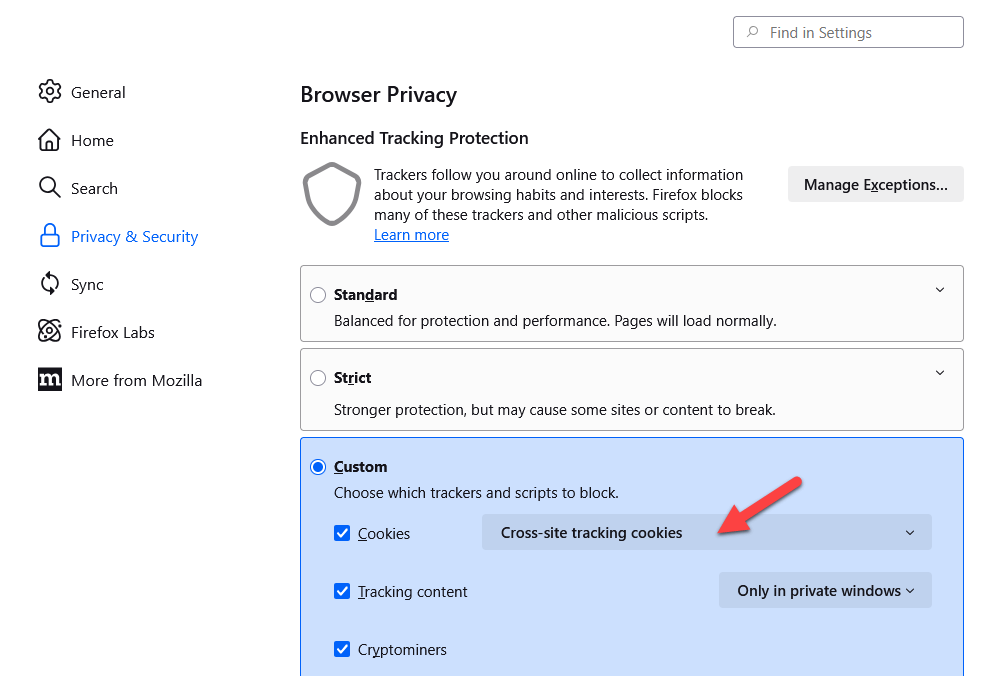
- If using Firefox, disable "Total Cookie Protection" as shown in this Firefox support article. Set the Custom Cookies property as shown in the image below.