Introduction
QSDA Pro analyzes and profiles Qlik Sense applications, helping you improve application quality and performance.
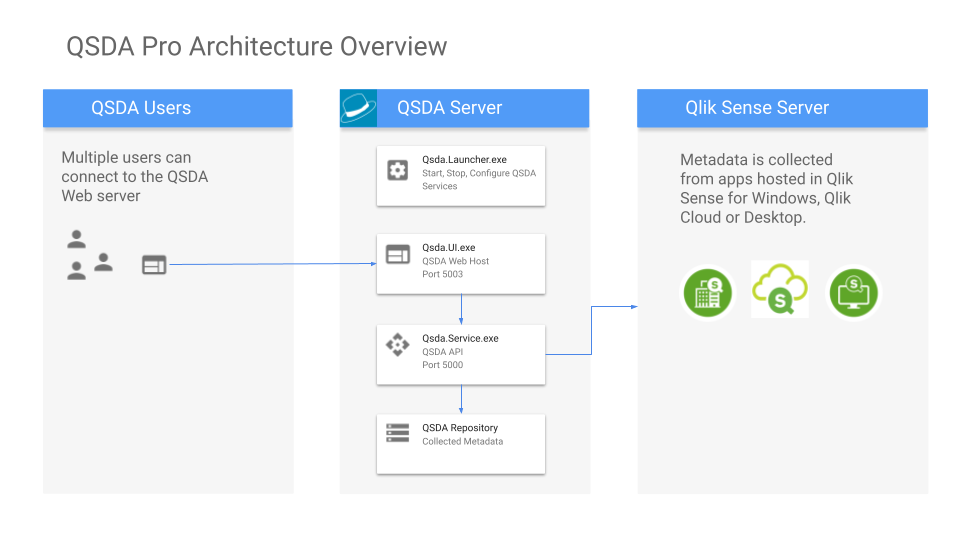
You install QSDA Server on any machine running a supported Windows version. Using a web browser, Qlik Developers can analyze applications hosted on Qlik Sense for Windows, Qlik Cloud, or QS Desktop. You can also access QSDA through a REST API.
QSDA Pro Terminology
A Collector task collects raw properties from a selected Qlik Sense application. This set of raw data is called a Collection. The Collection is stored in the QSDA Repository. The QSDA analyzer processes a Collection to produce an Analysis. QSDA generates an Analysis automatically when you start a new Collector, or manually when you load an existing Collection into memory using the Load button.
Collections and Analyses appear as colored tiles on the App List page:
 Collections in the QSDA repository, not currently loaded.
 In-process Collectors -- collecting properties or generating an Analysis.
 Analysis loaded in memory and ready to view.