Analysis Scoring
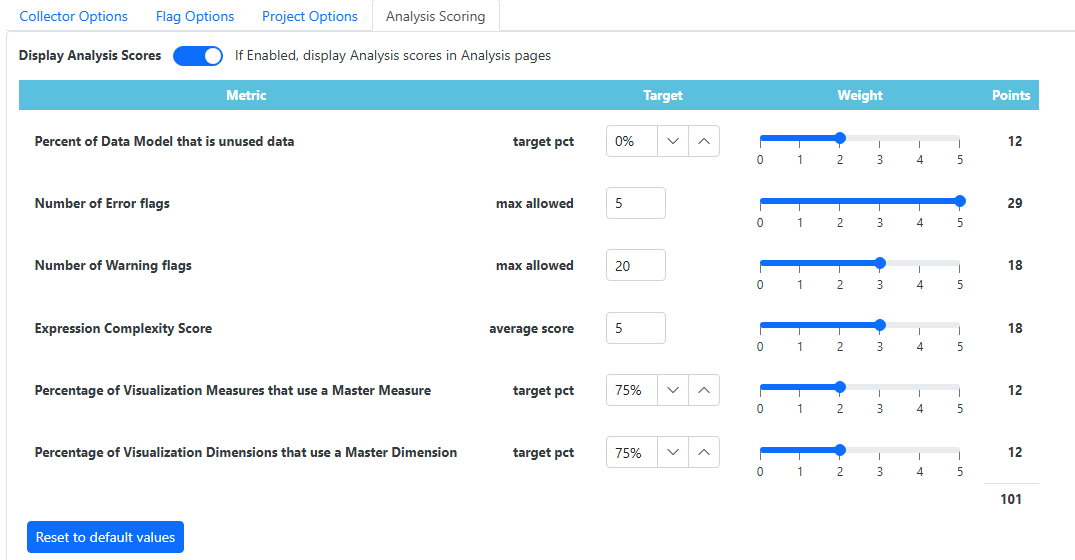
Use the Analysis Scoring page to define a weighted scoring model that quantifies the quality and health of a Qlik Sense application. Configure targets and relative weights for key performance and best-practice metrics such as unused data percentages, flag counts (errors/warnings), and master item adoption. These settings calculate a consolidated total score (e.g., 101 points), providing an objective benchmark for app optimization and governance.
Configuration Metrics
- Data Model Efficiency: Set targets for the percentage of unused data to minimize memory footprint.
- Flag Thresholds: Define the maximum allowable number of Error and Warning flags before the score is impacted.
- Complexity & Standardization: Weight the average expression complexity and the percentage of visualizations that use Master Dimensions and Measures.
- Weighted Scoring: Use the interactive sliders (0--5) to adjust the relative importance of each metric. The total point allocation updates dynamically.