Sorting and Filtering
Sorting
Sort grid displays by clicking a column heading. Click again to reverse the sort order. An arrow icon in the heading indicates the sort column and direction.
Filtering
Three filtering options are available:
- Column Filtering
- Row Filtering
- Page Filtering
Column Filtering
Filter columns by entering free-form text in the column filter input box or using the column dropdown when provided.
Enter a value in the filter text box and press
Additional filters apply with "And" logic.
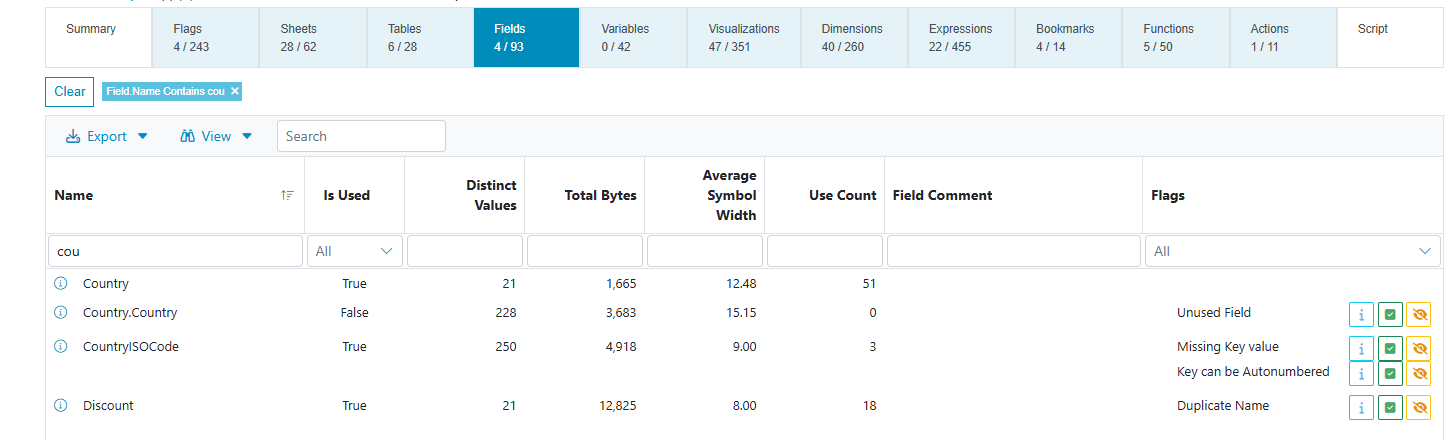
When a filter is active, the navigation ribbon updates to reflect associated counts. For example, filtering the Fields page updates the counts for Tables, Variables, and other related pages.

You can apply Column Filters to only one page at a time. Creating a column filter on another page replaces all filters from the previous page.
Clear Column Filters
Clear filters using one of these methods:
- Press the
 button on the Filter Bar to remove all filters.
 - Remove a single filter by clicking the "X" on the filter chip.
- For a dropdown filter, select "All" from the list.
- Remove the text from a filter text box and press
.
Column Filter Modifiers
Use a modifier in the filter to specify the filter operation type as shown below.
| Modifier | Example | Description | Column Type |
|---|---|---|---|
| = | =99 | Equal (default) | Number |
| != | !=99 | Not Equal | Number |
| > | >99 | Greater Than | Number |
| < | <99 | Less Than | Number |
| >= | >=99 | Greater Than or Equal | Number |
| <= | <=99 | Less Than or Equal | Number |
| * | *value | Starts With | Text |
| % | %value | Ends With | Text |
The modifier characters always function as modifiers. You cannot use them directly as search text. As a workaround, use the Page Filter followed by Row Filter "Filter to Visible".
Row Filtering
Filter by row by right-clicking in the grid and choosing an option from the context menu.
- Filter to Selected: Use the currently selected rows as filter criteria. Shading indicates selected status. Select multiple rows using Shift-click or Ctrl-click.
- Filter to Visible: Use all currently visible rows on the page as filter criteria. This works especially well with the page Search function.
-690713f95b589c85dba331c7f42fb179.png)
Page Filtering
Type text in the grid Search box and press
A Page Filter does not filter other pages.
Page Filters do not persist when you leave the page.
-f1ca141a276510ea52a0ae051889d47f.png)
Clear Page Filter
To clear a page filter, remove the text from the Search box and press Enter.