Service Parameters
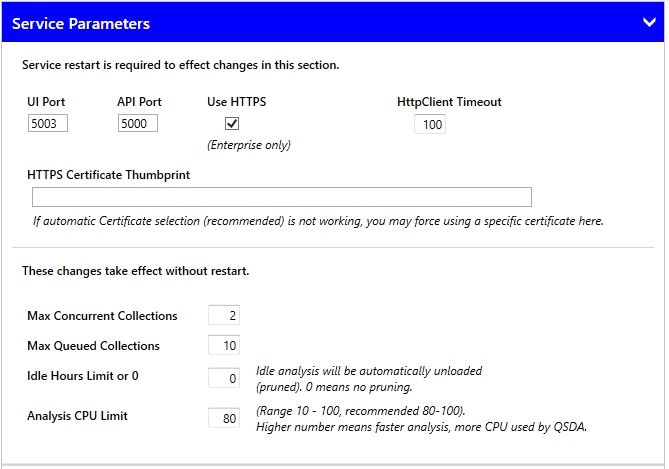
UI Port sets the port for the user interface service. The default of 5003 works in most cases.
API Port sets the port for the API service. Change this only if the port conflicts with another process on the machine.
Use HTTPS When checked, QSDA requires a valid SSL certificate installed on the machine running QSDA services. QSDA searches the LocalMachine/Personal certificate store for a certificate matching the hostname in the browser URL. If no match is found, QSDA attempts to locate a certificate matching "localhost". This option requires a valid QSDA Pro Enterprise license.
HTTPS Certificate Thumbprint If automatic certificate selection (recommended) does not work, you can force a specific certificate by entering its thumbprint here. Copy the thumbprint value from the certs page. Leave blank to use automatic selection.
HttpClient Timeout The default of 100 seconds suffices for most cases. If you receive "HttpClient Timeout exceeded" errors, increase this value.
Max Concurrent Collections Sets the number of collections that can run simultaneously. When this limit is reached, new collection requests are queued and start automatically when a slot becomes available.
Max Queued Collections Sets the number of collections that can wait in the queue. When this limit is reached, new collection requests are rejected.
Idle Hours Limit or 0 When set to a value greater than 0, QSDA automatically unloads analyses idle longer than this period. The pruning process runs only when you start or load a collection. "Idle" means no user interaction through the UI.
Analysis CPU Limit Sets the percentage of CPU QSDA may use per analysis. This is an approximation and does not override standard Windows priorities. Higher values may produce bursts of high CPU usage, but other tasks on the server still receive their share. The recommended value is 80. Decrease it if other tasks are overly impacted.